Please find below some information to assist you in getting ready for starting school.
Absence at start of 2026
Will your child be absent at the start of the new school year? Make sure you let us know:
- using your QParents account
- Calling our absence line 5351 2266
This really assists planning, our office staff and is essential in recording student numbers for funding. Thank you.
Office hours
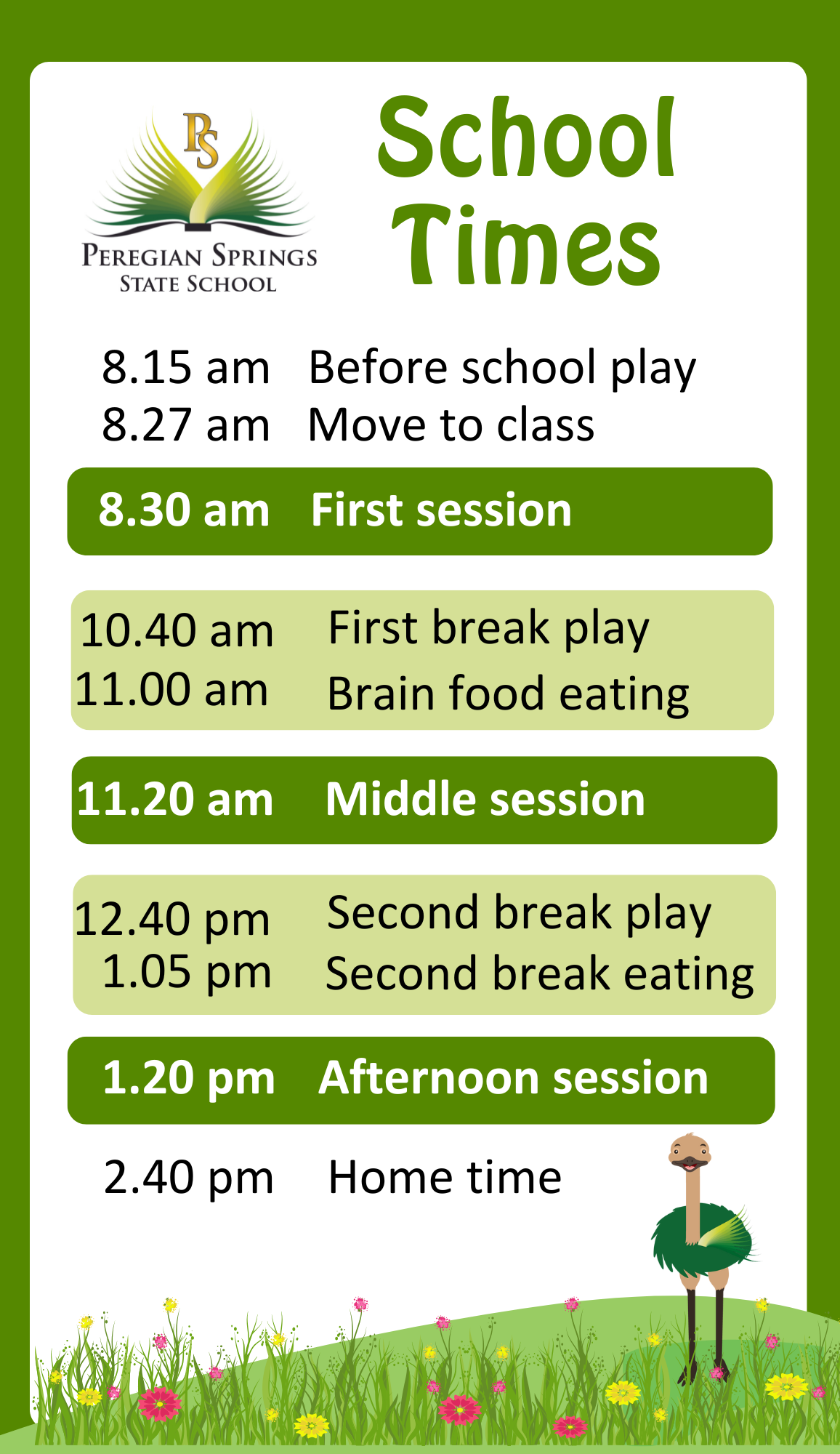
Our office is open:
In 2026 our office will open the week before school starts: Monday 19 January - Friday 23 January 2026
Our Meet the Teacher Day will be Friday 23 January 2026.
Classes Prep 2026 Prep 2026 parents will receive an email on Thursday 22 January 2026 by 3.30 pm. with details of their class and a booking link for 'Meet the Teacher' on Friday 23 January 2026. You can bring along your book packs on this day.
Meeting groups will be between 9.00 am. - 10.30 am.
**Check your junk/spam mail**
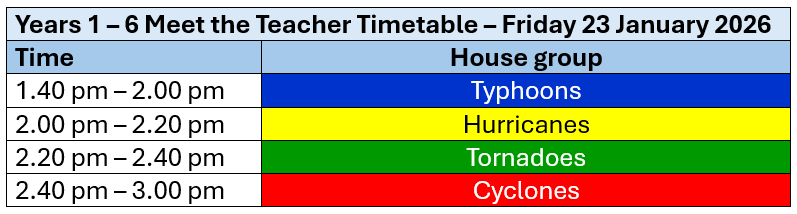
Classes Years 1 - 6 2026 On Friday 23 January 2026, we will have a 'Meet Your Teacher' afternoon for Years 1 - 6.
You can also bring along your book packs on this day.
You will receive an email by 1.00 pm. on Friday 23 January 2026 to inform you of your child's class. Class list information will not be available over the phone.
If you do not receive an email, still come to the school and there will be people at the gate who can tell you which class your child is in.
**Check your junk/spam mail**
QParents account

Have you set up your
QParents account yet? All families need a QParents account at the start of the new year for: consent forms for excursions, use of ICT (Information Technology) and invoicing/payments.
Visit the
sign in page to start the process. (You do not now need the invitation you were given at your enrolment interview in order to apply.)
QParents is a secure, online portal that has been created by the Department of Education to provide parents of Queensland state school students with 24-hour access to their child's information. The portal allows you to securely access information about your child and communicate directly with your child's school.
- Advise the school of absences
- Access all of your child's reports
- Make payments and view invoices
- Change contact details
- Complete online consent forms
Contact us 5351 2222 for help if you don't have enough ID, don't have your child's EQID or are having ANY issues! 😀
iPads in the classroom 2026 – your options and some information
At Peregian Springs State School, we are committed to fostering innovative, technology-supported learning environments that help students build essential 21st-century skills. While iPads are introduced in Prep, they are only used when they are the best learning tool for the task, supporting activities that encourage creativity, collaboration, and digital literacy and not an all-day everyday tool.
Our iPad Program - Flexible Pathways to Suit Your Needs We understand that each family's needs are unique, so we offer three flexible options to engage with our iPad program. These options ensure that every student can benefit from the advantages of iPads, whether through a family-owned device, a school-hired device, or a shared classroom iPad.
- Bring Your Own iPad (BYO): You may choose to provide an iPad for your child's use in school. This allows for custom settings and applications that meet your family's needs while supporting school activities. Families choosing this option are encouraged to:
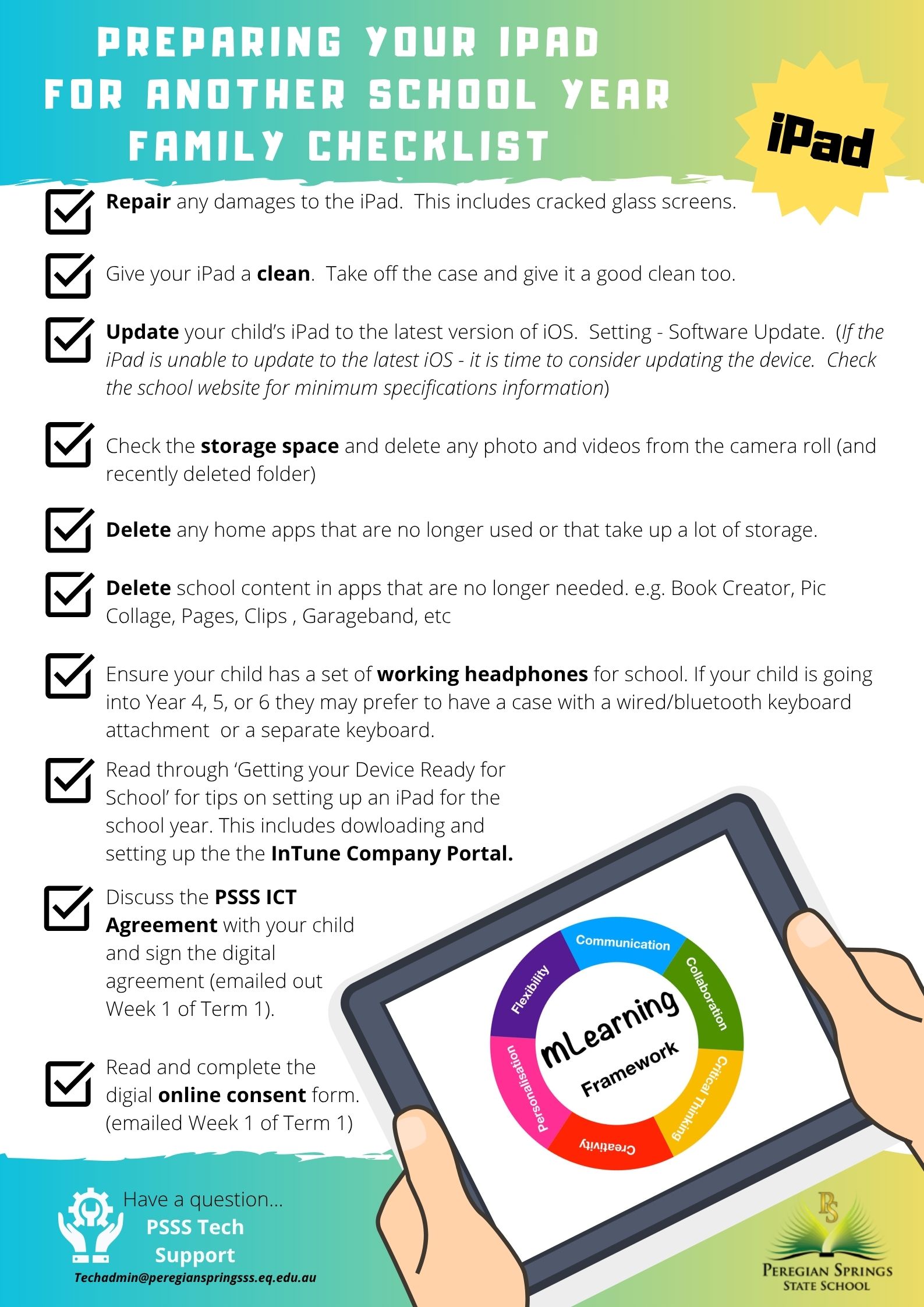
- Ensure the device can be updated to the latest operating system, allowing compatibility with school apps.
- Use screentime, family sharing and parental controls to set limits that align to your family needs.
- Follow our setup guide and required app checklist to keep the device ready for school use.
- Hire a School iPad: To make technology access easy, we offer a school-owned iPad hire option. This iPad comes pre-installed with school apps and can be taken home during term time, providing a consistent learning experience. Our 2025 hire program was a success, and we're pleased to offer it again in 2026. Spaces are limited for this option and families will need to complete an Expression of Interest before the end of the year.
- Use a Classroom iPad: Your child can use a shared classroom iPad during school hours as needed. This option provides access to iPads pre-installed with school-approved apps, making it easy for students to engage in tech-based activities throughout the day. They may need to share their iPad across the Prep classrooms.
If I purchase an iPad, how long will it be working? As your child progresses through primary school, updating their iPad will become necessary, typically around Year 3 or 4. This aligns well with advancing learning requirements and device capabilities, ensuring students have a seamless, tech-enhanced learning journey. It also means that by the time they are going to high school they will also be ready for a new device.
If you are interested in learning more about how iPads are used in the classroom please check out our
Apple Distinguished School Video For more detailed information, including technical setup and device requirements, please refer to our
mLearning Handbook on the
school website, or feel free to reach out to our Tech Support Team at
techadmin@peregianspringsss.eq.edu.au. They are happy to assist with setup questions or other technical needs.
Is it time for an update? For students in Years 3 to 6, having a device that's up-to-date and well-equipped is key to maximising learning opportunities.
If your child has been using an BYO iPad since Prep, now is a good time to consider whether an update might be beneficial. With advancing technology and increasing app requirements, updating iPads around this stage helps ensure compatibility with new resources and tools, enabling your child to engage seamlessly with learning activities.
Suggested Accessories for Years 4-6. As students begin typing longer texts and engaging in more complex projects, we recommend adding a Bluetooth or wired keyboard to their iPad setup. A keyboard can enhance both comfort and productivity, making it easier for students to work on extended writing tasks in a more ergonomic way.
Some students may also enjoy using a stylus for drawing, sketching, or note-taking, particularly if they have a creative interest or prefer digital writing. Both of these are optional extras that can enhance the learning of students.
We encourage you to have regular discussions with your child about digital safety and respect, monitor their device activity, and set boundaries around online communication. By working together, we can support our students in developing responsible digital habits and a positive online presence.
Thank you for partnering with us to create a safe and effective learning environment. We're excited to see the growth and accomplishments your child will achieve with iPads as key learning tools!
Book Lists and Student Resource Scheme (SRS)
2026 Student Resource Scheme will be invoiced at the start of 2026
Participating in the Student Resources Scheme (SRS) offers a convenient way for families to source the items that their child needs for school and ensures that all students have access to the same standard of resources.
Participating families will be invoiced a core fee (SRS Core) at the start of the new school year which will cover resources that are used by all students in that year level.
- The 2026 SRS is $100.00 per child.
Additional invoices will then be generated for nominated families:
Full details of the scheme including Terms and Conditions can be found here:
2026 PSSS SRS Parent Information.pdf and on our
website 2026 Booklists In addition to the above SRS, this list contains the required materials selected by the school staff for the 2026 school year:
Order online from our preferred supplier:
Office Choice .
Parents can purchase the items for our 2026 Book Lists from any supplier they wish - we do not have one allocated supplier, however the outlet above has all of the items our teachers require with an easy online order service.
Uniform
Visit our
website for full details.
Back to School Boost
The Queensland Government Back to school boost provides a $100 credit for each primary school student from the start of 2026. This $100 credit will assist families with school costs during 2026. A $100 credit will be placed on the account of all students enrolled in Prep to Year 6 from the start of the 2026 school year.
Families choose which cost they will use their $100 for throughout the year. For example, families may apply their 2026 Back to school boost towards the cost of the Student Resource Scheme (SRS) or, other school related expenses such as excursions, camps, or extra-curricular activities.
Please note that the Back to school boost cannot be used for reimbursement of purchases made at external stores, nor can it be provided as a cash payment to families or students.
Tuckshop and our P&C

Our
Tuckshop opens Monday – Friday and orders are placed online using the Qkr! app. Set up your account today so that you are ready to roll!
Medication at school
If you require staff to administer medication to your child at school, please contact the school office in the first instance to discuss your child's requirements.
Please note, school staff can only administer medication that:
- has been prescribed by a qualified health practitioner (e.g. doctor, dentist)
- is in its original container
- has an attached pharmacy label.
- over the counter medication (such a Panadol or creams) cannot be administered without a prescription from a medical practitioner.
Office staff will ask you to complete and sign a 'permission to administer form' for each medication.
Your child may require an Action plan, completed by a medical practitioner, to be kept at school in order to instruct staff on treatment.